Sephiria Tablet Placement: Using the SephiriaSolver Tool
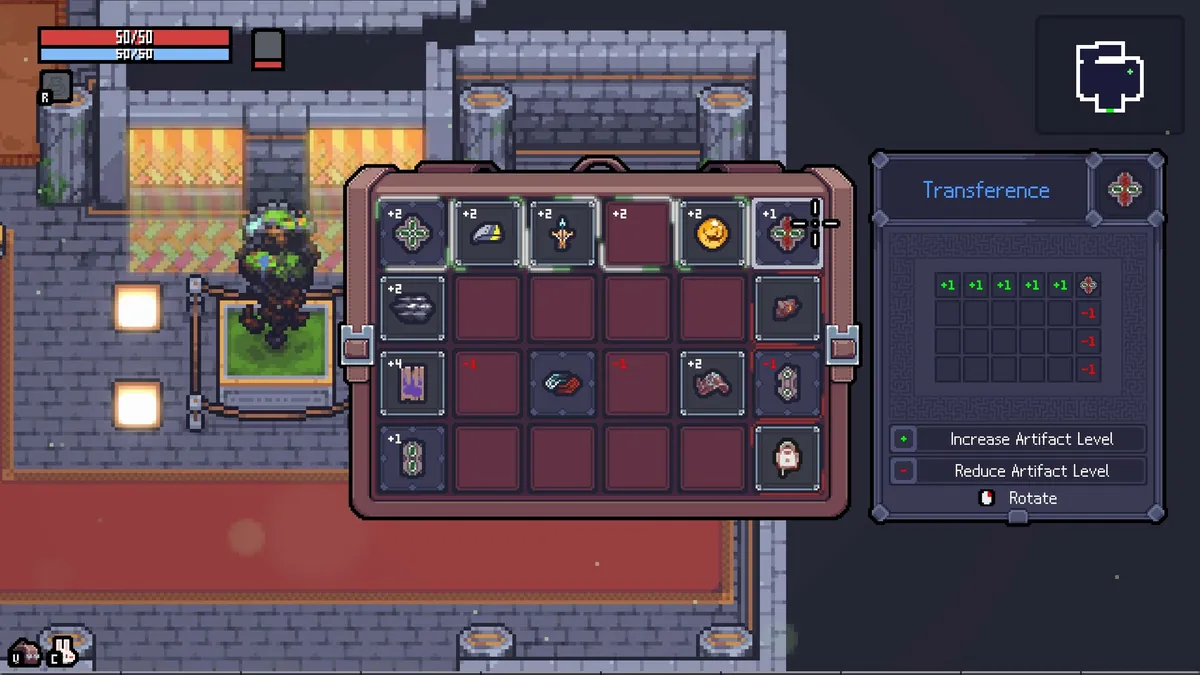
The fastest way to place tablets in Sephiria is not to work it out by hand. SephiriaSolver, a free browser tool maintained by the player forestsquirrel, takes the tablets you hold and searches for the grid layout that maximises your buffs — and since its Rulesets update it can be told what you actually want ("at least three cells at +5, the rest as high as possible") rather than one blunt global goal. This page explains the tool's modes, marks and limits, using its author's own documentation, so you know which button to press for which situation.
If you need the underlying rules first — tablets are emitters that push a level onto other cells, and a cell's level is the level of the artifact sitting in it — start with the tablet families and the inventory grid pages.
The four-step loop
- Select the tablets you have.
- Pick how long the solver may search.
- Click Solve.
- Choose whichever result fits your needs and apply it to the grid.
Search time is a budget: Quick (1 s), Standard (5 s), Deep (15 s), Max (30 s). The author's note is that longer searches find better layouts, not just more of them; use Quick while you are iterating and Deep or Max "when you want the last slot squeezed out for a build." You can cancel mid-search and keep what has been found.
Two engines: Legacy and Rulesets
The solver has two engines, switchable at the top of the panel.
Legacy is the original three global modes:
| Mode | What it optimises |
|---|---|
| Perfect Coverage | Fill every slot while maximising total buff |
| Maximize | Push individual slots to the highest values while maximising total buff |
| Target Value | Fill as many slots as possible with a value you choose, while maximising total buff |
Rulesets replaces the single goal with a list of rules, each reading {Exactly / At least / At most} N slots with buff {= / ≥ / ≤} V. You can stack as many as you like and drag them to set which rule gets first pick of the good slots. A final Rest of slots setting — Maximize, Coverage or Target — decides what happens to cells no rule claimed, and it is always lowest priority so it can never outbid a rule.
The author explains the problem Rulesets solves better than we can: if you want +5 on just two slots, Target Value wastes buff pushing every slot toward 5, and pinning slots with target marks forces a fixed layout. A rule asks for a count without naming which cells, so the solver keeps its freedom "and stops spending buff where nothing asked for it."
The tool validates a ruleset before solving and says outright if it is impossible with your tablets and slot count. If it solves but cannot satisfy everything, it reports which rule fell short and by how much "rather than pretending it's a clean win."
Marks
Two kinds of mark work in any mode and alongside Rulesets:
- ×2 Slot — for the Mystic combo. Mark the slots you want doubled; up to three can be marked since v2.0.
- Target Slot — click a cell and set a value it must equal or exceed. The solver treats targets as first priority in every mode. A target that is already satisfied also counts toward a matching rule, so you do not budget the same slot twice.
Reading the results
The best three layouts show as cards. Everything else sits behind Browse all results — a Deep search can return a couple of hundred — in a table that sorts by any column and filters by total buff, covered slots, or "at least N slots with buff ≥ V." Columns show how many slots got each value, so you can compare the shape of two layouts at a glance, and any row applies straight to the grid. Identical layouts are collapsed into groups by default; click the badge to expand one.
Grid size, merging and edge cases
Three details from the changelog matter for real runs:
- Starter Grid button sets the early-game 6×4 inventory, for players who have not yet bought the expansions on the Destiny Inscription tree. The maximum grid the tool supports was raised to 60 slots after a player showed the in-game grid can be pushed far larger than the tool assumed.
- Merged tablets (from the Tablet Combiner) now inherit the activation position of their parts — a bug reported by a user and fixed in v2.1.
- Items that interact with the grid — those that need a specific placement or react to neighbours — are part of Rulesets as of the Items Update, and all tablets are in the tool "including those which let items ignore positional constraints." The Curse tablet from the Skeleton costume and the Wedge tablet were added after reports, which tells you the list is community-maintained: if a tablet is missing, the author asks to be told.
The tool tracks the game: v2.0 added the 1.0 patch's tablets "with adjustments where the patch notes changed them" and noted two tablets still to be found in-game. The 1.0.19 notes list seven new tablets, so if you hold one the solver does not know, that is why.
What the solver cannot know
It optimises numbers on cells. It does not know that a +5 cell is wasted on an artifact whose maximum level is 3 — that check is yours, and the in-game Q / E preview while hovering an artifact is the fastest way to make it. It does not know your combo plan, which is why the Ingenuity breadth route and the depth routes want different shapes from the same tablets. And it cannot see two 1.0.30 fixes that changed how imprinting behaves in play: a tablet no longer disappears without imprinting when its activation conditions are unmet, and undiscardable tablets can no longer be fed to the Combiner. Plan the layout in the tool; confirm the imprint in the game.
- Steam Community Guide 'How to place tablets for best configuration' by forestsquirrel — tool documentation, changelog v1.0 → Items Update, contributor credits
- SephiriaSolver (forestsquirrel.github.io/SephiriaSolver) — the tool itself, checked 4 September 2026
- Steam announcement 1.0.30 (Tablet Imprinting and Tablet Combiner fixes), 1.0.26 (tablet effects in certain languages)