Sephiria Inventory Grid: Slot Levels and Tablet Buffs
The single sentence that unlocks this system is in a 2025 patch note, describing a tablet: "Level +1 is applied to the slots above and below."
That is the whole mechanic. Every cell in your bag carries a number, and that number is the level of whatever artifact is sitting in it. Tablets are not passive items you carry — they are emitters that push numbers onto specific cells. Arranging your bag is arranging those numbers.
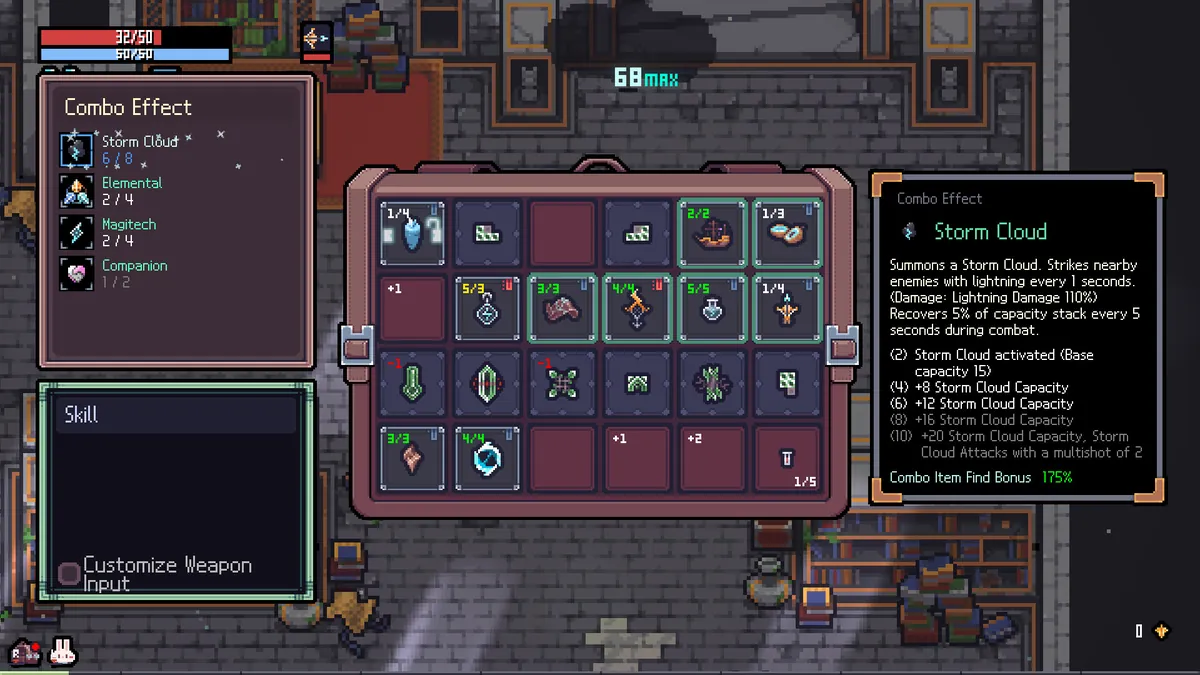
The grid
The grid is 6 columns wide. It starts at 6×4 = 24 slots and the Destiny Inscription's Expanding Pouch node adds +6 across three ranks, taking you to 6×5 = 30. That is why the community tooling defaults to a 6×5 board and offers a "Starter Grid" button for players who have not finished the node yet.
Expansion is granular, not row-at-a-time — extra cells append one at a time, left to right, so a partially filled bottom row is a normal state. Two other sources of slots exist: the Explorer Miracle (+6, but it grants no starting item) and in-run inventory expansion event rooms. The Magic Workshop side quest adds 2 slots reserved for potions only.
1.0 also added a Side Bag for spare items, unlocked through Destiny Inscription. Read the one line that matters: items in the Side Bag are inactive. It is storage, not a second board.
Nothing has a Tetris footprint. Every artifact and every tablet occupies exactly one cell. The artifact Multipurpose Belt gives +1 to all three elemental stats for each artifact in the top row, capped at +6 — six cells in a row, one artifact each. That is the confirmation.
Position matters, not just adjacency
Four separate mechanisms make where a thing sits meaningful:
1. Tablets project fixed offsets. A tablet's effect is a list of relative cells with a buff value each. Across the 62 tablets in the community dataset, footprints range from 1 cell to 8 (Thorns), the maximum reach is 3 cells away, and the largest single-cell buff is +5 (Conviction). Twelve tablets project negative values — a careless layout actively lowers your artifact levels.
2. Some tablets buff whole lines. Twelve of them hit an entire row, column or diagonal, either relative to themselves or anchored to a fixed grid edge. Requital is the strongest at +3 to its whole row.
3. Four tablets are edge-anchored and do nothing off their edge. Good Will needs the bottom, Shade the top, Flag the left, Justice either left or right. Place these first when planning; anywhere else they are dead weight taking up a cell.
4. A few artifacts read absolute position. Multipurpose Belt keys off the top row. Chalcedony Key grants one of Sturdy, Ember, Glacier or Magitech based on where you put it. Raye's Star Fragment references the left slot.
There is also one board-wide oddity: the Curse tablet (from the Skeleton costume) applies a chessboard pattern — +1 to odd cells, −1 to even ones, across the entire grid. Its own position does not limit its reach, but the parity of the cell it sits on decides which colour gets the buff. Move it one cell in any direction and the whole pattern inverts. Rotating it does nothing.
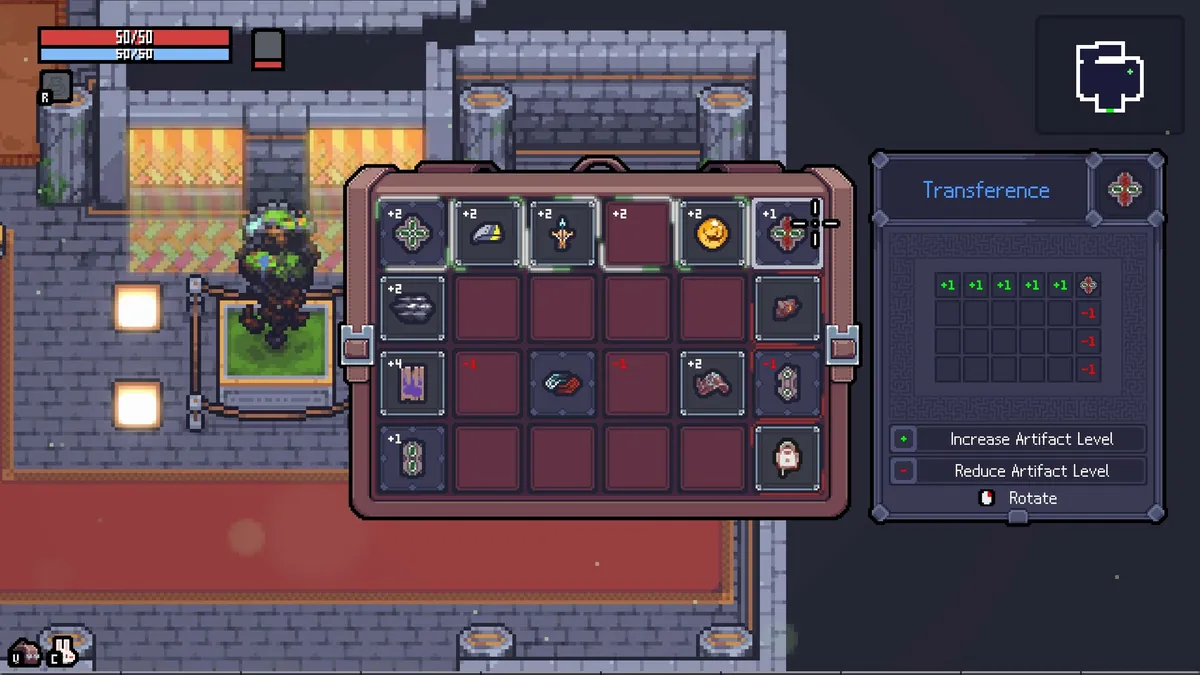
Rotation
Tablets rotate in 90° steps with R, or since 1.0.19 with a middle mouse click. But 18 of the 62 tablets cannot be rotated at all, and another 14 are rotatable yet symmetric enough that only one or two rotations are actually distinct. Self-referential row and column buffs swap axis at 90°; diagonal buffs flip direction.
How to build a high-value slot
"+7 slot" is community shorthand for a cell whose accumulated tablet buff is 7. Three routes get you there:
Stacking. Overlap a line tablet with high-value discrete tablets on the same cell — Requital (+3 to its row) under Conviction (+5 on one cell) is already +8 on the intersection. The Endure talent at level 5 hands you a Foundation tablet at run start, which is a free whole-row +1 to build from.
The Mystic combo. Mystic doubles a cell's net value, negatives included, on up to three chosen slots. Building a cell to +4 and doubling it is cheaper than reaching +8 by addition. One caveat worth stating: the 2025 combo-revamp text described Mystic as doubling a random artifact, while the current community tooling lets you pick the slots. Those two descriptions have never been reconciled publicly.
Tablet Engraving. This is the real answer. A talent capstone at level 20 lets you consume a tablet to permanently engrave its effect into the bag — the buff stays, the cell frees up. A player describing it: "instead of having to juggle around tablet positions through your run, you can instead inscribe them into your bag, effectively eating the tablet to just mark those spots with the benefits permanently." Since patch 0.8.7, engraved positions survive inventory expansion, which they did not originally.
The Tablet Combiner
Added in 0.10.14, this is a random object that synthesises two tablets into one. The merged tablet combines both sources' discrete effects (baked at whatever rotations you chose at merge time) and both line buffs. It becomes non-rotatable if either parent was. If both parents had parity effects, those sum.
Community tooling refuses to merge two tablets with different edge requirements, on the explicit grounds that the in-game behaviour is unconfirmed — which is a reasonable position to copy.
Enchantment is a different system
Do not confuse tablet buffs with Enchantment. Enchantment nodes contain an altar that raises an artifact's level directly, usable 1–3 times depending on altar size (the minimum was raised from 1 to 2 in an earlier patch). Enchantment is a property of the artifact itself and travels with it; a tablet buff is a property of the cell and stays behind if you move the artifact. A Potion of Awakening in the potion shop grants one enchantment.
A practical build order
- Place your edge-anchored tablets first, or drop them.
- Lay a line tablet to establish a baseline row.
- Put the artifacts you most need at max level on the highest cells — and remember max level varies per artifact, so a +5 cell is wasted on a max-3 item. Preview levels with Q / E while hovering to see exactly what a tablet arrangement would do.
- Reserve the top row if you are running Multipurpose Belt.
- Prefer depth over breadth. The advice players repeat: once you have three or more useful artifacts, take the tablet over another artifact — "having a few fully boosted Artifacts will help you usually more than just another 0-level one."
What is not confirmed
Whether per-cell buffs have a cap. The true maximum in-game grid size — community tooling raised its ceiling to 60 slots after a player reported exceeding it, but no official figure exists. And the exact tablet total: TEAM HORAY says "about 70," the best community dataset has 62 and its maintainer believes at least one is still missing. We are not going to print a precise number for something the developer describes approximately.
Checked against 1.0.30
Grid shapes and slot costs are untouched through 1.0.30. The one change that matters here is Tablet Imprinting (1.0.30): the tablet no longer disappears without imprinting its effect when the activation conditions are not met — before this fix, imprinting a positional tablet in the wrong spot cost you the tablet and gave nothing back. The Side Bag rule from 1.0.19 still applies: items in it are inactive, and (1.0.23) the Alchemy combo now correctly ignores tablets that land in the Side Bag rather than the main grid.
- Steam store page — 'Strategic inventory system: Collect and arrange Artifacts and empower them with the different Tablets'
- Steam announcements 0.7.32 (Tablet 'Spike' level rule), 0.8.7 (engraving stability), 0.10.14 (Tablet Combiner), 1.0 Update
- Steam Community Guide — 'How to place tablets for best configuration' by ForestSquirrel
- SephiriaSolver open-source tablet dataset and rules spec (forestsquirrel.github.io/SephiriaSolver, TABLETS.md)
- Steam Community Guide — 'Basic Guide to Sephiria' by FireBrother